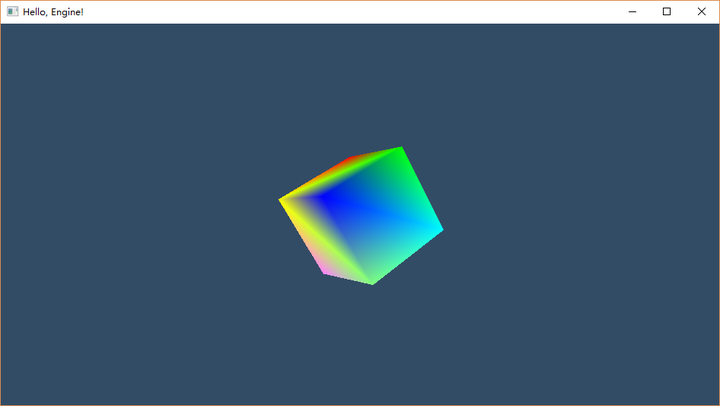
上一篇我们在Windows上用OpenGL 4.0版本的接口实现了一个旋转的立方体(当然,实现这个功能实际上并没有使用什么4.0级别的特性。图形API规格和功能级别是两个概念)
到此为止我们应该对于一个基本的画面绘制流程有一定的了解了。虽然我们还没有涉及到诸如贴图光照,以及曲面细分,异步计算等概念,但是作为整个渲染管道的骨架已经基本搭建好了。
接下来让我们一起看看图形API的最前沿,DirectX 12和Vulkan。因为我们要写的是次世代引擎,我们需要考虑使用这些最新的图形API。
我们之所以没有从最新的API开始,因为我们有个学习的过程。图形API不是一步发展到今天这个样子的,我们需要了解这个过程。这不仅能缓和我们的学习曲线,更能让我们看清发展的走向。而能否正确预测这个走向,是评价一个架构好坏的重要基准之一。
DX12我参考的主要资料是【*1】Tutorial: Migrating Your Apps to DirectX* 12 – Part 1
— (题外话开始)–
很意外地,看到了Lv Wenwei的名字。他是蜗牛的技术总监,我2014年刚刚进入SIE的第一个任务,就是到苏州去支持他们移植开发《九阳神功》。虽然那个时候我其实刚进公司,对PS4开发基本一无所知。
吕老师谈吐很儒雅,技术看上去也相当不错。3年前的故事最终是以我把SIE日本的台湾人老师(也是我在SIE的导师)请来救场结束。
— (题外话结束)–
我们开始编码。我是一边看着【*2】Creating a basic Direct3D 12 component 一边升级我的代码的。
由于我们的代码已经比较长了。从本篇起我将不再贴出所有的代码。完整的代码请到GitHub上面去下载。本篇对应的branch为article_15。
首先我们是替换头文件。
// include the basic windows header file
 #include <windows.h>
 #include <windowsx.h>
+#include <stdio.h>
 #include <tchar.h>
 #include <stdint.h>

-#include <d3d11.h>
-#include <d3d11_1.h>
+#include <d3d12.h>
+#include "d3dx12.h"
+#include <DXGI1_4.h>
 #include <d3dcompiler.h>
 #include <DirectXMath.h>
 #include <DirectXPackedVector.h>
 #include <DirectXColors.h>

+#include <wrl/client.h>
+
+#include <string>
+#include <exception>
+
去掉了DX11的头文件,加入DX12的头文件。
从DirectX 10开始,微软导入了DXGI的概念。【*3】
DXGI与DX的关系有点类似OpenGL的Loader与OpenGL的关系;前者是创建绘图的上下文,后者是进行实际的绘图。
d3dx12.h 是一个工具头文件。它并不是DX12的一部分。微软是通过GitHub来提供这个文件的。这个文件主要是为了方便我们使用DX12,让代码看起来简洁一些。我在article_15的branch里面也提供了这个文件的拷贝。
#include语句当中文件名两边是<>还是””的秘密是:如果是系统或者sdk的头文件,就是<>;如果是放在我们项目当中的文件,就是””。这虽然是一些细节,但是不正确使用有的时候是会出现一些奇奇怪怪的问题。
下面的wrl/client.h是WRL的一部分。WRL是Windows Runtime Library的简称。这也是一个辅助性质的库,提供了一些符合design pattern的模板。我们这里主要是使用一个名为ComPtr的模板,用来比较智能地管理COM的Interface。
没错,又是COM。其实前面介绍的OpenGL那种运行时查询并绑定API入口的方式就和COM颇为类似。COM的中心思想就是每个模块都有一个众所周知的接口:IUnknown。这个接口支持一个Qurey方法,来查找其它的接口。这样就可以实现运行时的入口查找和调用。
接下来是一个C++异常陷阱。COM规范规定,所有的COM调用的返回值都是一个HRESULT类型的值,用来报告调用是否成功。我们前面的代码是在每次调用后检查这个返回值,如果失败进行相关log输出之后返回或者中断执行。这种写法的好处是代码可移植性高,缺点是代码里面插入了很多和原本要做的事情无关的代码,简洁性变差。我们这里参考微软官方的例子采用抛c++异常的方式处理这个返回值检查。但是需要注意的是c++异常的可移植性是不太好的。不过这里的代码本来就是平台专用代码,再加上是我们的支线任务,主要是用来打怪升级并探地图的,所以我们就这么用。
然后是全局变量的定义。我们现在因为是在探路,采用最为直观的“平的”代码方式,就是基本上是C的写法,不进行类的封装。等我们确定图形模块的划分之后,这些变量大部分都是要放到类里面去的。而另外一些则作为启动参数允许配置:如分辨率,色深等。
// global declarations
+const uint32_t nFrameCount     = 2;
+const bool     bUseWarpDevice = true;
+D3D12_VIEWPORT                  g_ViewPort = {0.0f, 0.0f,
+                                        static_cast(nScreenWidth),
+                                        static_cast(nScreenHeight)};   // viewport structure
+D3D12_RECT                      g_ScissorRect = {0, 0,
+
-IDXGISwapChain          *g_pSwapchain = nullptr;              // the pointer to the swap chain interface
+ComPtr<IDXGISwapChain3>         g_pSwapChain = nullptr;             // the pointer to the swap chain interface
-ID3D11Device            *g_pDev       = nullptr;
          // the pointer to our Direct3D device interface
+ComPtr<ID3D12Device>            g_pDev       = nullptr;             // the pointer to our Direct3D device interface
-ID3D11DeviceContext     *g_pDevcon    = nullptr;              // the pointer to our Direct3D device context
-
-ID3D11RenderTargetView  *g_pRTView    = nullptr;
+ComPtr<ID3D12Resource>          g_pRenderTargets[nFrameCount];      // the pointer to rendering buffer. [descriptor]
+uint32_t    g_nRtvDescriptorSize;
-ID3D11InputLayout       *g_pLayout    = nullptr;              // the pointer to the input layout
-ID3D11VertexShader      *g_pVS        = nullptr;              // the pointer to the vertex shader
-ID3D11PixelShader       *g_pPS        = nullptr;              // the pointer to the pixel shader

+ComPtr<ID3D12CommandAllocator>  g_pCommandAllocator;                // the pointer to command buffer allocator
+ComPtr<ID3D12CommandQueue>      g_pCommandQueue;                    // the pointer to command queue
+ComPtr<ID3D12RootSignature>     g_pRootSignature;                   // a graphics root signature defines what resources are bound to the pipeline
+ComPtr<ID3D12DescriptorHeap>    g_pRtvHeap;                         // an array of descriptors of GPU objects
+ComPtr<ID3D12PipelineState>     g_pPipelineState;                   // an object maintains the state of all currently set shaders
+                                                                    // and certain fixed function state objects
+                                                                    // such as the input assembler, tesselator, rasterizer and output manager
+ComPtr<ID3D12GraphicsCommandList>   g_pCommandList;                 // a list to store GPU commands, which will be submitted to GPU to execute when done
+
+
-ID3D11Buffer            *g_pVBuffer   = nullptr;              // Vertex Buffer
+ComPtr<ID3D12Resource>          g_pVertexBuffer;                         // the pointer to the vertex buffer
+D3D12_VERTEX_BUFFER_VIEW        g_VertexBufferView;                 // a view of the vertex buffer
可以看到最大的变化是DX12将GPU的命令队列暴露了出来,并且不再自动进行CPU与GPU之间的同步。
之前的DX版本对我们来说只有CPU一条时间线,所有API调用看起来是同步的。然而在DX12当中,现在多了一条GPU的时间线,大部分绘图API也从同步变成了“录制”,即,仅仅是在GPU命令队列当中生成一些指令。这个包含了指令的队列,什么时候提交给GPU进行处理,需要我们自己进行控制。所以多了好几个用于同步CPU和GPU的变量:
+// Synchronization objects
+uint32_t            g_nFrameIndex;
+HANDLE              g_hFenceEvent;
+ComPtr<ID3D12Fence> g_pFence;
+uint32_t            g_nFenceValue;
另外一个变化就是在创建和管理方面,不再细分GPU在执行绘图指令的时候会参照的各种资源,比如顶点缓冲区,RenderingTarget等。这些统统交由一个成为Resource的接口去处理。这是因为我们已经很接近显卡驱动了。在那么低的层面,这些东西统统是buffer,没啥太大区别。
在Shader的加载方面,变化不大。但是作为演示,本次我们采用运行时编译的方式。
Layout的概念取消掉了,取而代之的是Pilpeline State Object,用以将GPU的各个功能模块串联起来形成一个渲染流水线。
因为绘图API变成了异步录制执行方式,我们需要确保这些资源在gpu实际完成绘图之前可用。在这个例子当中,我们强制GPU首先完成这些指令的执行,并通过Fence实现和GPU的同步。
// this is the function that loads and prepares the shaders
 void InitPipeline() {
-    // load and compile the two shaders
-    ID3DBlob *VS, *PS;
-
-    D3DReadFileToBlob(L"copy.vso", &VS);
-    D3DReadFileToBlob(L"copy.pso", &PS);
-
-    // encapsulate both shaders into shader objects
-    g_pDev->CreateVertexShader(VS->GetBufferPointer(), VS->GetBufferSize(), NULL, &g_pVS);
-    g_pDev->CreatePixelShader(PS->GetBufferPointer(), PS->GetBufferSize(), NULL, &g_pPS);
+    ThrowIfFailed(g_pDev->CreateCommandAllocator(D3D12_COMMAND_LIST_TYPE_DIRECT, IID_PPV_ARGS(&g_pCommandAllocator)));
+
+    // create an empty root signature
+    CD3DX12_ROOT_SIGNATURE_DESC rsd;
+    rsd.Init(0, nullptr, 0, nullptr, D3D12_ROOT_SIGNATURE_FLAG_ALLOW_INPUT_ASSEMBLER_INPUT_LAYOUT);
+
+    ComPtr<ID3DBlob> signature;
+    ComPtr<ID3DBlob> error;
+    ThrowIfFailed(D3D12SerializeRootSignature(&rsd, D3D_ROOT_SIGNATURE_VERSION_1, &signature, &error));
+    ThrowIfFailed(g_pDev->CreateRootSignature(0, signature->GetBufferPointer(), signature->GetBufferSize(), IID_PPV_ARGS(&g_pRootSignature)));
+
+    // load the shaders
+#if defined(_DEBUG)
+    // Enable better shader debugging with the graphics debugging tools.
+    UINT compileFlags = D3DCOMPILE_DEBUG | D3DCOMPILE_SKIP_OPTIMIZATION;
+#else
+    UINT compileFlags = 0;
+#endif
+    ComPtr<ID3DBlob> vertexShader;
+    ComPtr<ID3DBlob> pixelShader;
+
+    D3DCompileFromFile(
+        GetAssetFullPath(L"copy.vs").c_str(),
+        nullptr,
+        D3D_COMPILE_STANDARD_FILE_INCLUDE,
+        "main",
+        "vs_5_0",
+        compileFlags,
+        0,
+        &vertexShader,
+        &error);
+    if (error) { OutputDebugString((LPCTSTR)error->GetBufferPointer()); error->Release(); throw std::exception(); }
+
+    D3DCompileFromFile(
+        GetAssetFullPath(L"copy.ps").c_str(),
+        nullptr,
+        D3D_COMPILE_STANDARD_FILE_INCLUDE,
+        "main",
+        "ps_5_0",
+        compileFlags,
+        0,
+        &pixelShader,
+        &error);
+    if (error) { OutputDebugString((LPCTSTR)error->GetBufferPointer()); error->Release(); throw std::exception(); }

-    // set the shader objects
-    g_pDevcon->VSSetShader(g_pVS, 0, 0);
-    g_pDevcon->PSSetShader(g_pPS, 0, 0);

     // create the input layout object
-    D3D11_INPUT_ELEMENT_DESC ied[] =
+    D3D12_INPUT_ELEMENT_DESC ied[] =
     {
-        {"POSITION", 0, DXGI_FORMAT_R32G32B32_FLOAT, 0, 0, D3D11_INPUT_PER_VERTEX_DATA, 0},
-        {"COLOR", 0, DXGI_FORMAT_R32G32B32A32_FLOAT, 0, 12, D3D11_INPUT_PER_VERTEX_DATA, 0},
+        {"POSITION", 0, DXGI_FORMAT_R32G32B32_FLOAT, 0, 0, D3D12_INPUT_CLASSIFICATION_PER_VERTEX_DATA, 0},
+        {"COLOR", 0, DXGI_FORMAT_R32G32B32A32_FLOAT, 0, 12, D3D12_INPUT_CLASSIFICATION_PER_VERTEX_DATA, 0},
     };

-    g_pDev->CreateInputLayout(ied, 2, VS->GetBufferPointer(), VS->GetBufferSize(), &g_pLayout);
-    g_pDevcon->IASetInputLayout(g_pLayout);
-
-    VS->Release();
-    PS->Release();
+    // describe and create the graphics pipeline state object (PSO)
+    D3D12_GRAPHICS_PIPELINE_STATE_DESC psod = {};
+    psod.InputLayout    = { ied, _countof(ied) };
+    psod.pRootSignature = g_pRootSignature.Get();
+    psod.VS             = { reinterpret_cast<UINT8*>(vertexShader->GetBufferPointer()), vertexShader->GetBufferSize() };
+    psod.PS             = { reinterpret_cast<UINT8*>(pixelShader->GetBufferPointer()), pixelShader->GetBufferSize() };
+    psod.RasterizerState= CD3DX12_RASTERIZER_DESC(D3D12_DEFAULT);
+    psod.BlendState     = CD3DX12_BLEND_DESC(D3D12_DEFAULT);
+    psod.DepthStencilState.DepthEnable  = FALSE;
+    psod.DepthStencilState.StencilEnable= FALSE;
+    psod.SampleMask     = UINT_MAX;
+    psod.PrimitiveTopologyType = D3D12_PRIMITIVE_TOPOLOGY_TYPE_TRIANGLE;
+    psod.NumRenderTargets = 1;
+    psod.RTVFormats[0]  = DXGI_FORMAT_R8G8B8A8_UNORM;
+    psod.SampleDesc.Count = 1;
+    ThrowIfFailed(g_pDev->CreateGraphicsPipelineState(&psod, IID_PPV_ARGS(&g_pPipelineState)));
+
+    ThrowIfFailed(g_pDev->CreateCommandList(0,
+                D3D12_COMMAND_LIST_TYPE_DIRECT,
+                g_pCommandAllocator.Get(),
+                g_pPipelineState.Get(),
+                IID_PPV_ARGS(&g_pCommandList)));
+
+    ThrowIfFailed(g_pCommandList->Close());
 }

 // this is the function that creates the shape to render
@@ -116,31 +257,127 @@ void InitGraphics() {
         {XMFLOAT3(-0.45f, -0.5f, 0.0f), XMFLOAT4(0.0f, 0.0f, 1.0f, 1.0f)}
     };


-    // create the vertex buffer
-    D3D11_BUFFER_DESC bd;
-    ZeroMemory(&bd, sizeof(bd));

-    bd.Usage = D3D11_USAGE_DYNAMIC;                // write access access by CPU and GPU
-    bd.ByteWidth = sizeof(VERTEX) * 3;             // size is the VERTEX struct * 3
-    bd.BindFlags = D3D11_BIND_VERTEX_BUFFER;       // use as a vertex buffer
-    bd.CPUAccessFlags = D3D11_CPU_ACCESS_WRITE;    // allow CPU to write in buffer
-    g_pDev->CreateBuffer(&bd, NULL, &g_pVBuffer);       // create the buffer

+    const UINT vertexBufferSize = sizeof(OurVertices);
+
+    // Note: using upload heaps to transfer static data like vert buffers is not
+    // recommended. Every time the GPU needs it, the upload heap will be marshalled
+    // over. Please read up on Default Heap usage. An upload heap is used here for
+    // code simplicity and because there are very few verts to actually transfer.
+    ThrowIfFailed(g_pDev->CreateCommittedResource(
+        &CD3DX12_HEAP_PROPERTIES(D3D12_HEAP_TYPE_UPLOAD),
+        D3D12_HEAP_FLAG_NONE,
+        &CD3DX12_RESOURCE_DESC::Buffer(vertexBufferSize),
+        D3D12_RESOURCE_STATE_GENERIC_READ,
+        nullptr,
+        IID_PPV_ARGS(&g_pVertexBuffer)));
+
-    // copy the vertices into the buffer
-    D3D11_MAPPED_SUBRESOURCE ms;
-    g_pDevcon->Map(g_pVBuffer, NULL, D3D11_MAP_WRITE_DISCARD, NULL, &ms);    // map the buffer
-    memcpy(ms.pData, OurVertices, sizeof(VERTEX) * 3);                       // copy the data
-    g_pDevcon->Unmap(g_pVBuffer, NULL);                                      // unmap the buffer

+    // copy the vertices into the buffer
+    uint8_t *pVertexDataBegin;
+    CD3DX12_RANGE readRange(0, 0);                  // we do not intend to read this buffer on CPU
+    ThrowIfFailed(g_pVertexBuffer->Map(0, &readRange,
+                reinterpret_cast<void**>(&pVertexDataBegin)));               // map the buffer
+    memcpy(pVertexDataBegin, OurVertices, vertexBufferSize);                 // copy the data
+    g_pVertexBuffer->Unmap(0, nullptr);                                      // unmap the buffer
+
+    // initialize the vertex buffer view
+    g_VertexBufferView.BufferLocation = g_pVertexBuffer->GetGPUVirtualAddress();
+    g_VertexBufferView.StrideInBytes  = sizeof(VERTEX);
+    g_VertexBufferView.SizeInBytes    = vertexBufferSize;
+
+    // create synchronization objects and wait until assets have been uploaded to the GPU
+    ThrowIfFailed(g_pDev->CreateFence(0, D3D12_FENCE_FLAG_NONE, IID_PPV_ARGS(&g_pFence)));
+    g_nFenceValue = 1;
+
+    // create an event handle to use for frame synchronization
+    g_hFenceEvent = CreateEvent(nullptr, FALSE, FALSE, nullptr);
+    if (g_hFenceEvent == nullptr)
+    {
+        ThrowIfFailed(HRESULT_FROM_WIN32(GetLastError()));
+    }


+    // wait for the command list to execute; we are reusing the same command
+    // list in our main loop but for now, we just want to wait for setup to
+    // complete before continuing.
+    WaitForPreviousFrame();
+}
所谓Fence,就是内存上一个变量。这个变量GPU和CPU都可以读写,而且通过cache控制的方法避免GPU和CPU之间出现对于这个值的内容不同步的情况。我们知道,在当代计算机系统结构当中,无论是CPU还是GPU都是有很复杂的cache结构,这种结构往往会导致CPU/GPU看到的变量的值与实际内存上保存的值不一致。
https://en.m.wikipedia.org/wiki/Cache_(computing)
而这个Fence,就是一个保证不会出现这种情况的变量。GPU在完成图形渲染任务之后,会更新这个Fence的值。而CPU在检测到这个值被更新之后,就知道GPU已经完成渲染,可以释放/重用相关资源了。
下面是构建整个swapchain。
// this function prepare graphic resources for use
-HRESULT CreateGraphicsResources(HWND hWnd)
+void CreateGraphicsResources(HWND hWnd)
+{
+    if (g_pSwapChain.Get() == nullptr)
+    {
+#if defined(_DEBUG)
+        // Enable the D3D12 debug layer.
+        {
+            ComPtr<ID3D12Debug> debugController;
+            if (SUCCEEDED(D3D12GetDebugInterface(IID_PPV_ARGS(&debugController))))
             {
-    HRESULT hr = S_OK;
-    if (g_pSwapchain == nullptr)
+                debugController->EnableDebugLayer();
+            }
+        }
+#endif
+
+        ComPtr<IDXGIFactory4> factory;
+        ThrowIfFailed(CreateDXGIFactory1(IID_PPV_ARGS(&factory)));
+
+        if (bUseWarpDevice)
+        {
+            ComPtr<IDXGIAdapter> warpAdapter;
+            ThrowIfFailed(factory->EnumWarpAdapter(IID_PPV_ARGS(&warpAdapter)));
+
+            ThrowIfFailed(D3D12CreateDevice(
+                warpAdapter.Get(),
+                D3D_FEATURE_LEVEL_11_0,
+                IID_PPV_ARGS(&g_pDev)
+                ));
+        }
+        else
         {
+            ComPtr<IDXGIAdapter1> hardwareAdapter;
+            GetHardwareAdapter(factory.Get(), &hardwareAdapter);
+
+            ThrowIfFailed(D3D12CreateDevice(
+                hardwareAdapter.Get(),
+                D3D_FEATURE_LEVEL_11_0,
+                IID_PPV_ARGS(&g_pDev)
+                ));
+        }
+
+        // Describe and create the command queue.
+        D3D12_COMMAND_QUEUE_DESC queueDesc = {};
+        queueDesc.Flags = D3D12_COMMAND_QUEUE_FLAG_NONE;
+        queueDesc.Type  = D3D12_COMMAND_LIST_TYPE_DIRECT;
+
+        ThrowIfFailed(g_pDev->CreateCommandQueue(&queueDesc, IID_PPV_ARGS(&g_pCommandQueue)));
+
         // create a struct to hold information about the swap chain
         DXGI_SWAP_CHAIN_DESC scd;

@@ -148,103 +385,109 @@ HRESULT CreateGraphicsResources(HWND hWnd)
         ZeroMemory(&scd, sizeof(DXGI_SWAP_CHAIN_DESC));

         // fill the swap chain description struct
-        scd.BufferCount = 1;                                    // one back buffer
-        scd.BufferDesc.Width = SCREEN_WIDTH;
-        scd.BufferDesc.Height = SCREEN_HEIGHT;
+        scd.BufferCount = nFrameCount;                           // back buffer count
+        scd.BufferDesc.Width = nScreenWidth;
+        scd.BufferDesc.Height = nScreenHeight;
         scd.BufferDesc.Format = DXGI_FORMAT_R8G8B8A8_UNORM;     // use 32-bit color
         scd.BufferDesc.RefreshRate.Numerator = 60;
         scd.BufferDesc.RefreshRate.Denominator = 1;
         scd.BufferUsage = DXGI_USAGE_RENDER_TARGET_OUTPUT;      // how swap chain is to be used
+        scd.SwapEffect  = DXGI_SWAP_EFFECT_FLIP_DISCARD;        // DXGI_SWAP_EFFECT_FLIP_DISCARD only supported after Win10
+                                                                // use DXGI_SWAP_EFFECT_DISCARD on platforms early than Win10
         scd.OutputWindow = hWnd;                                // the window to be used
-        scd.SampleDesc.Count = 4;                               // how many multisamples
+        scd.SampleDesc.Count = 1;                               // multi-samples can not be used when in SwapEffect sets to
+                                                                // DXGI_SWAP_EFFECT_FLOP_DISCARD
         scd.Windowed = TRUE;                                    // windowed/full-screen mode
-        scd.Flags = DXGI_SWAP_CHAIN_FLAG_ALLOW_MODE_SWITCH;     // allow full-screen switching
+        scd.Flags    = DXGI_SWAP_CHAIN_FLAG_ALLOW_MODE_SWITCH;  // allow full-screen transition

-        const D3D_FEATURE_LEVEL FeatureLevels[] = { D3D_FEATURE_LEVEL_11_1,
-                                                    D3D_FEATURE_LEVEL_11_0,
-                                                    D3D_FEATURE_LEVEL_10_1,
-                                                    D3D_FEATURE_LEVEL_10_0,
-                                                    D3D_FEATURE_LEVEL_9_3,
-                                                    D3D_FEATURE_LEVEL_9_2,
-                                                    D3D_FEATURE_LEVEL_9_1};
-        D3D_FEATURE_LEVEL FeatureLevelSupported;
-
-        HRESULT hr = S_OK;
-
-        // create a device, device context and swap chain using the information in the scd struct
-        hr = D3D11CreateDeviceAndSwapChain(NULL,
-                                      D3D_DRIVER_TYPE_HARDWARE,
-                                      NULL,
-                                      0,
-                                      FeatureLevels,
-                                      _countof(FeatureLevels),
-                                      D3D11_SDK_VERSION,
-                                      &scd,
-                                      &g_pSwapchain,
-                                      &g_pDev,
-                                      &FeatureLevelSupported,
-                                      &g_pDevcon);
-
-        if (hr == E_INVALIDARG) {
-            hr = D3D11CreateDeviceAndSwapChain(NULL,
-                                      D3D_DRIVER_TYPE_HARDWARE,
-                                      NULL,
-                                      0,
-                                      &FeatureLevelSupported,
-                                      1,
-                                      D3D11_SDK_VERSION,
+        ComPtr<IDXGISwapChain> swapChain;
+        ThrowIfFailed(factory->CreateSwapChain(
+                    g_pCommandQueue.Get(),                      // Swap chain needs the queue so that it can force a flush on it
                     &scd,
-                                      &g_pSwapchain,
-                                      &g_pDev,
-                                      NULL,
-                                      &g_pDevcon);
-        }
+                    &swapChain
+                    ));
+
+        ThrowIfFailed(swapChain.As(&g_pSwapChain));

-        if (hr == S_OK) {
+        g_nFrameIndex = g_pSwapChain->GetCurrentBackBufferIndex();
         CreateRenderTarget();
-            SetViewPort();
         InitPipeline();
         InitGraphics();
     }
 }
-    return hr;
-}
因为采用了ComPtr智能指针,不需要手动release了。(会在相关变量被重用或者程序结束的时候自动release)
void DiscardGraphicsResources()
 {
-    SafeRelease(&g_pLayout);
-    SafeRelease(&g_pVS);
-    SafeRelease(&g_pPS);
-    SafeRelease(&g_pVBuffer);
-    SafeRelease(&g_pSwapchain);
-    SafeRelease(&g_pRTView);
-    SafeRelease(&g_pDev);
-    SafeRelease(&g_pDevcon);
+    WaitForPreviousFrame();
+
+    CloseHandle(g_hFenceEvent);
 }
下面是录制绘图指令到command list当中。
+void PopulateCommandList()
 {
+    // command list allocators can only be reset when the associated
+    // command lists have finished execution on the GPU; apps should use
+    // fences to determine GPU execution progress.
+    ThrowIfFailed(g_pCommandAllocator->Reset());
+
+    // however, when ExecuteCommandList() is called on a particular command
+    // list, that command list can then be reset at any time and must be before
+    // re-recording.
+    ThrowIfFailed(g_pCommandList->Reset(g_pCommandAllocator.Get(), g_pPipelineState.Get()));
+
+    // Set necessary state.
+    g_pCommandList->SetGraphicsRootSignature(g_pRootSignature.Get());
+    g_pCommandList->RSSetViewports(1, &g_ViewPort);
+    g_pCommandList->RSSetScissorRects(1, &g_ScissorRect);
+
+    // Indicate that the back buffer will be used as a render target.
+    g_pCommandList->ResourceBarrier(1, &CD3DX12_RESOURCE_BARRIER::Transition(
+                g_pRenderTargets[g_nFrameIndex].Get(),
+                D3D12_RESOURCE_STATE_PRESENT,
+                D3D12_RESOURCE_STATE_RENDER_TARGET));
+
+    CD3DX12_CPU_DESCRIPTOR_HANDLE rtvHandle(g_pRtvHeap->GetCPUDescriptorHandleForHeapStart(), g_nFrameIndex, g_nRtvDescriptorSize);
+    g_pCommandList->OMSetRenderTargets(1, &rtvHandle, FALSE, nullptr);
+
     // clear the back buffer to a deep blue
     const FLOAT clearColor[] = {0.0f, 0.2f, 0.4f, 1.0f};
-    g_pDevcon->ClearRenderTargetView(g_pRTView, clearColor);
+    g_pCommandList->ClearRenderTargetView(rtvHandle, clearColor, 0, nullptr);

     // do 3D rendering on the back buffer here
     {
         // select which vertex buffer to display
-        UINT stride = sizeof(VERTEX);
-        UINT offset = 0;
-        g_pDevcon->IASetVertexBuffers(0, 1, &g_pVBuffer, &stride, &offset);
+        g_pCommandList->IASetVertexBuffers(0, 1, &g_VertexBufferView);

         // select which primtive type we are using
-        g_pDevcon->IASetPrimitiveTopology(D3D10_PRIMITIVE_TOPOLOGY_TRIANGLELIST);
+        g_pCommandList->IASetPrimitiveTopology(D3D10_PRIMITIVE_TOPOLOGY_TRIANGLELIST);

         // draw the vertex buffer to the back buffer
-        g_pDevcon->Draw(3, 0);
+        g_pCommandList->DrawInstanced(3, 1, 0, 0);
+    }
+
+    // Indicate that the back buffer will now be used to present.
+    g_pCommandList->ResourceBarrier(1, &CD3DX12_RESOURCE_BARRIER::Transition(
+                g_pRenderTargets[g_nFrameIndex].Get(),
+                D3D12_RESOURCE_STATE_RENDER_TARGET,
+                D3D12_RESOURCE_STATE_PRESENT));
+
+    ThrowIfFailed(g_pCommandList->Close());
 }
提交上面录制的绘图指令(command list),并执行frame buffer交换,输出画面。
// this is the function used to render a single frame
void RenderFrame()
{
+    // record all the commands we need to render the scene into the command list
+    PopulateCommandList();
+
+    // execute the command list
+    ID3D12CommandList *ppCommandLists[] = { g_pCommandList.Get() };
+    g_pCommandQueue->ExecuteCommandLists(_countof(ppCommandLists), ppCommandLists);
+
     // swap the back buffer and the front buffer
-    g_pSwapchain->Present(0, 0);
+    ThrowIfFailed(g_pSwapChain->Present(1, 0));
+
+    WaitForPreviousFrame();
 }
绘图指令由Draw升级为了DrawInstanced。后者支持一次drawcall绘制一组相同的物体。这个功能在绘制诸如树木、花草、篱笆、地面、吃瓜群众等群体环境物体时十分有效,可以减少很多CPU-GPU之间的同步成本。在VR当中,同一个物体会出现在两个眼睛的视野当中,也是采用这种方式减少drawcall的。
编译命令行如下(Visual Studio工具链):
D:wenliSourceReposGameEngineFromScratchPlatformWindows>cl /EHsc helloengine_d3d12.cpp user32.lib d3d12.lib dxgi.lib d3dcompiler.lib
这篇代码因为用了很多微软的东西,暂时无法用clang(包括clang-cl)编译。不过反正本来就是windows平台独有的DX12,这没关系。
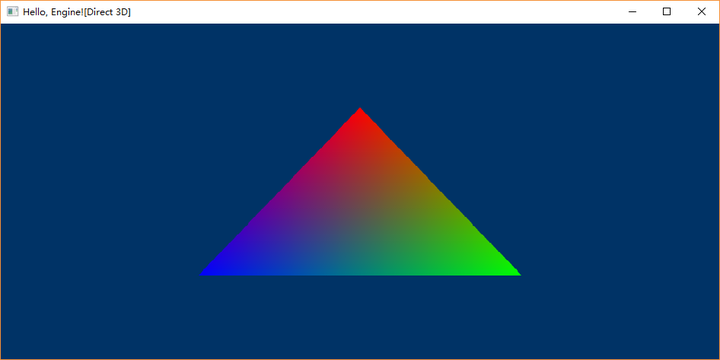
好了。这样我们就完成了DX11到DX12的升级。下一篇将会加入贴图。
(– EOF –)
参考资料:
- Tutorial: Migrating Your Apps to DirectX* 12 – Part 1
- Creating a basic Direct3D 12 component
- DXGI
- DirectXMath Programming Guide

本作品采用知识共享署名 4.0 国际许可协议进行许可。







 文礼简阔
文礼简阔 